Japan eSIM

📱Works with iPhone, Samsung, Google Pixel & more -> Check Compatibility

📱Works with iPhone, Samsung, Google Pixel & more -> Check Compatibility

Premium Network
KDDI / SoftBank
Coverage #1
Data Options
Daily / Total / Unlimited
Flexible Choice
Max Speed
5G / 4G LTE
High Speed

Technical Specifications

  • Network Selection
    For Daily Plans
    SoftBank 5G
    Japan Flag Native IP
    Ultra-Low Latency. Best for Local Apps & Gaming.
    Total / Unlimited
    KDDI 5G + SoftBank 5G
    Dual Coverage
    Widest Signal. Auto-switch. Best for Sakura & Rural Areas.
  • Plan Type
    Data Only
    Use WhatsApp/VoIP for calls. No phone number provided.
  • Activation
    Automatic
    Auto-start on arrival; turn on data roaming for Flow Go eSIM.
  • Support
    Chat to support
    Instant help via Livechat & Email.
  • ID Verify Not Required
  • Hotspot
    Supported
    Share data with laptop/iPad.
  • Speed Policy
    For Unlimited (*5G) Plans:
    Guarantees 1080p HD streaming speeds, even under Fair Usage Policy.
    For Daily & Total Plans:
    High-speed 5G data per quota, then Unlimited 128kbps.
  • Coverage
    Nationwide & Shinkansen
    Covers Tokyo, Osaka, Kyoto, Okinawa, Hokkaido & Mt. Fuji.
    Seamless signal on Bullet Trains & rural areas.

AwardJapan's Best 5G for Sakura Season

Powered by Japan's Top 2 Award-Winning Networks.

SoftBank #1 5G Availability: Winner of the "5G Availability" Award. Keeps you on 5G signal longer.
KDDI au #1 Reliability: Unbeatable Stability. Lag-free experience for video calls & gaming.
$3.99 USD
Instant digital delivery. No shipping required.
Data
Days

Why people choose Flow Go eSIM?

Why people choose Flow Go eSIM?

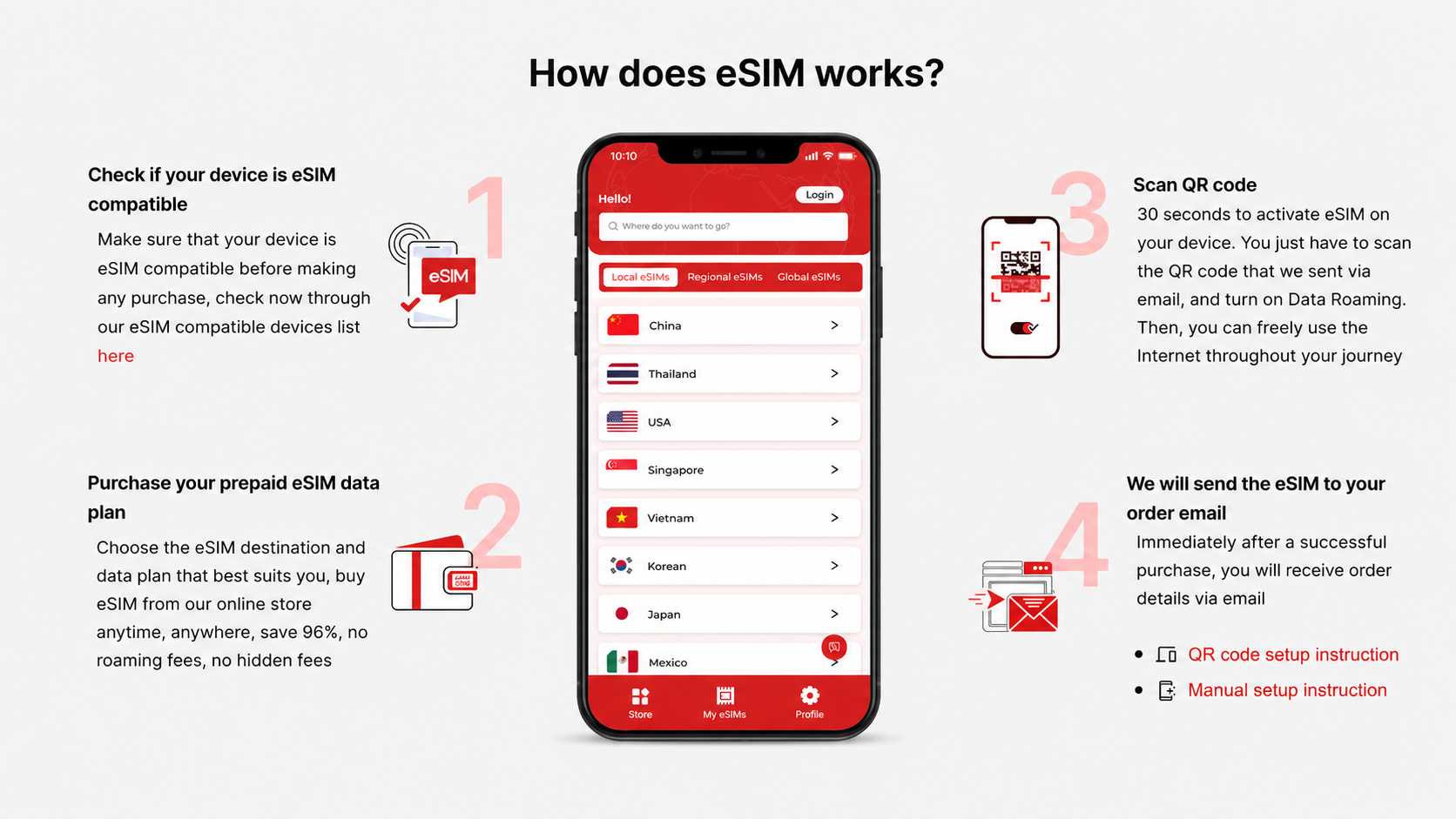
Setup Flow Go eSIM in minutes

Check & Chose
Verify your phone is eSIM-compatible and unlocked. Pick the plan that fits your trip and check out.
Install Before You Fly
We email your eSIM instantly. On stable Wi-Fi, scan the QR for one-tap install.
Arrive & Activate
On arrival, enable the Flow Go eSIM line in Settings and, turn Data Roaming: ON. It auto-connects and activates.
Manage & Add More
Need track available data & days in an App? Coming soon...
Check & Chose
Verify your phone is eSIM-compatible and unlocked. Pick the plan that fits your trip and check out.
Install Before You Fly
We email your eSIM instantly. On stable Wi-Fi, scan the QR for one-tap install.
Arrive & Activate
On arrival, enable the Flow Go eSIM line in Settings and, turn Data Roaming: ON. It auto-connects and activates.
Manage & Add More
Need track available data & days in an App? Coming soon...
1 / 4

Flow Go eSIM Frequently Asked Questions

What is an eSIM?

An eSIM is a digital SIM that allows you to use mobile data without inserting a physical SIM card. With an eSIM, you can connect to supported mobile networks on compatible devices while traveling

How do I use my Flow Go eSIM

You can find detailed usage instructions on each product detail page. We also provide setup guides for different device types: Samsung Galaxy, iPhone, and Google Pixel.

Is my device compatible with Flow Go eSIM

Flow Go eSIM works with unlocked devices that support eSIM. Before purchasing, please check whether your device is compatible on our eSIM compatible devices page.

Does Flow Go eSIM include a phone number,calls, or SMS?

Plans of Flow Go eSIM include mobile data only. They do not include a phone number, voice calls, or SMS. You can use mobile data with apps such as WhatsApp, FaceTime, Messenger, WeChat, or other internet-based communication apps.

How will I receive my eSIM after purchase?

After your purchase is completed, your eSIM will be sent to the email address used at checkout. Please follow the guide and scan the QR code to add the eSIM to your compatible device.

How can I request a refund?

Refund requests are handled according to our Refund Policy. If you need to request a refund, please review the policy page and contact us with your order details.

Cart

loading